Dosimeter (local)
With the dosimeter functionality, the noise dose or the occupational noise exposure level can also be determined for non-stationary workplaces. The procedure is based on the activity-related method (strategy 1) of DIN EN ISO 9612 for the determination of the occupational noise exposure level. The typical work shift is divided into activities of similar noise immission. The noise exposure level is then calculated from the duration of the activity and the level during the activity using the reference time (typically an 8-hour work shift).
Additional general preliminary remarks:
- For each station, at which an activity is performed, an individual receiver is positioned at the location/station of the activity.
- The energy equivalent continuous sound pressure level calculated for each receiver corresponds to the (site-specific) noise exposure level L_EX if work is performed exclusively at that location during the entire work shift.
- If no user-defined reference time is used (see "General" tab), the L_EX corresponds to the daily noise exposure level L_EX,8h.
- For the determination of the exposure level, the partial levels per receiver are required. If several variants are used, it is therefore advisable to store the partial levels also for each variant (see Variants), otherwise the exposure levels are displayed exclusively in the variant that was calculated last.
Library table Dosimeter,Dosimeter object
 By clicking on the Dosimeter icon in the toolbar or via the menu bar Tables|Libraries(local)|Dosimeter the Dosimeter table can be opened:
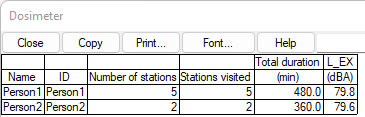
Dialog Dosimeter,Definition of activity profiles
Each entry in this table corresponds to an activity profile for which the exposure level is calculated. Double-clicking on a table entry opens a dialog for specifying the activity profile:
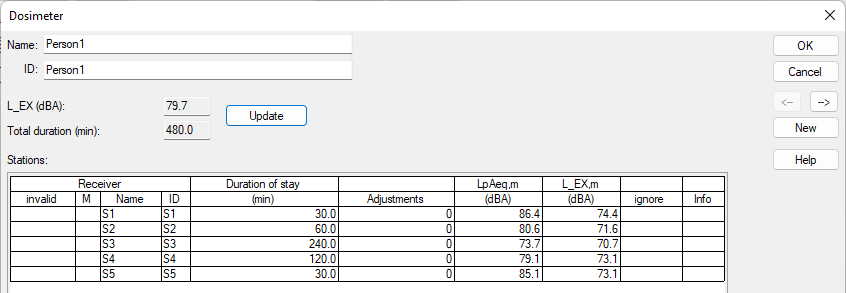
In the "Stations" table, activity locations/receivers and associated activity durations/stay durations can be defined. The following relationships apply:
Calculation of the exposure level
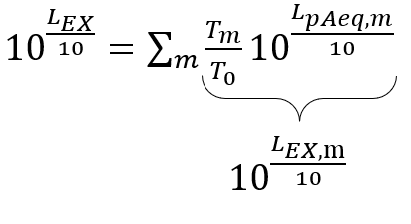 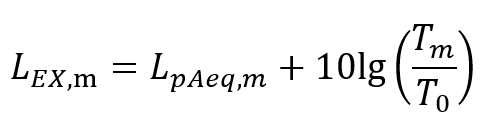 |
where: * taking into account the adjusted workload of the sources (if defined, see Table Sources/Source groups with differing workload) |
Button Update
The read-only displays for total duration and exposure level next to the Update button may not be updated automatically (e.g. if a changed duration of stay is entered directly in the stations table). Updating can be forced with this button.
Dialog Dosimeter Station
Double-clicking on an entry in the table of stations opens a dialog for specifying the dosimeter station.
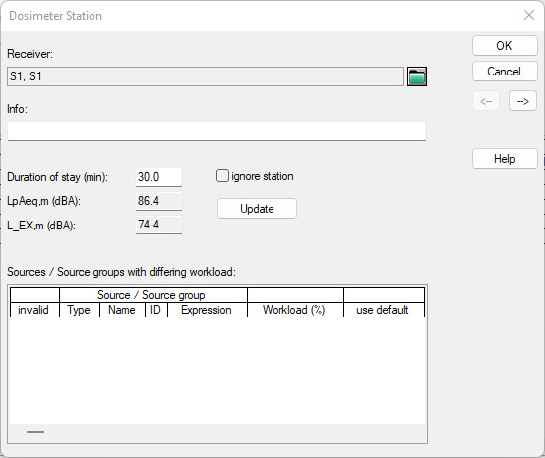
Receiver selection
The receiver belonging to the dosimeter station can be selected via the file selection icon  . After its selection, the name and ID of the receiver appear in the display field.
Info input field
In the info input field, user-defined additional information to the station description can be specified, e.g. "Grinding", "Sawing, suction on". This can be particularly helpful when using sources/source groups with differing workloads (see below).
invalid station
If no receiver is assigned to the station, the station is invalid and is not taken into account for the exposure level, nor for the total duration of stay.
Checkbox ignorie station
Instead of deleting the station, it can be excluded from the exposure level calculation using this checkbox (e.g. to quickly check the influence of removal on the exposure level).
Button Update
The read-only displays for the L_pAeq,m and L_EX,m next to the Update button may not be updated automatically (e.g. if changed workloads are entered directly in the table with sources/source groups of different workloads). Updating can be forced with this button.
Table Sources/Source groups with differing workload
Entries in the "Sources/source groups with differing workload" table can be used to define exactly which operating state each source is in during the stay at the station. This is particularly relevant if the source itself is not in continuous operation during the work shift, i.e. has an operating time (see Common Input Data - Sources, Option Operating time (min)). Without entries, the partial levels generated by the source - which already contain the emission-side operating time correction - are used directly for the calculation of the exposure level.
If several table entries apply to one and the same source (e.g. explicitly two entries for the same source object or implicitly via the affiliation to source groups), the lowest (bottom-most) table entry is decisive.
Dialog Dosimeter source configuration
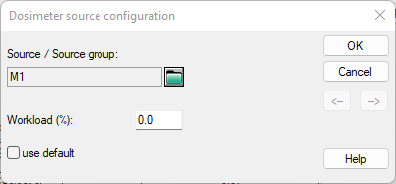
Selection SourceSource group
The source or source group for which workload differing from its operating time is to be specified can be selected via the file selection icon . "Type" corresponds to the individual object types (PS point source, LS line source, AS area source, AV vertical area source, BS box-type source, GRP for ObjectTree group). After the selection, the name (Attribute BEZ) appears in the display field.
invalid selection
If no source/source group is assigned, the source selection is invalid and will be disregarded.
Workload (%)
The workload can be used to explicitly define the operating state of the selected source or source group during the activity at the station. 0% corresponds to a source/machine that is switched off, 100% corresponds to a machine that is switched on for the entire duration of the activity. If, for example, a machine is in operation for 4h of the 8h work shift (240 min source operating time, 480 min reference time) and a person at the workstation directly next to the machine carries out an activity for 3h, it can be precisely defined via the workload whether the machine is running or not during the activity. Consistency checks do not take place at this point (if, for example, a 100% workload during a 7 h activity were defined for a machine running for a total of only 4 h).
Checkbox use default
Instead of deleting the source entry, the entry can be deactivated using this checkbox (e.g. to quickly check the influence of the omission).
Application example
Person 1 carries out activities at 5 stations, the machines run continuously with the exception of machine M3. M3 is only in operation for half of the work shift (exposure time of all sources of the source group 240 min). M3 is running exactly when person 1 is also working there.
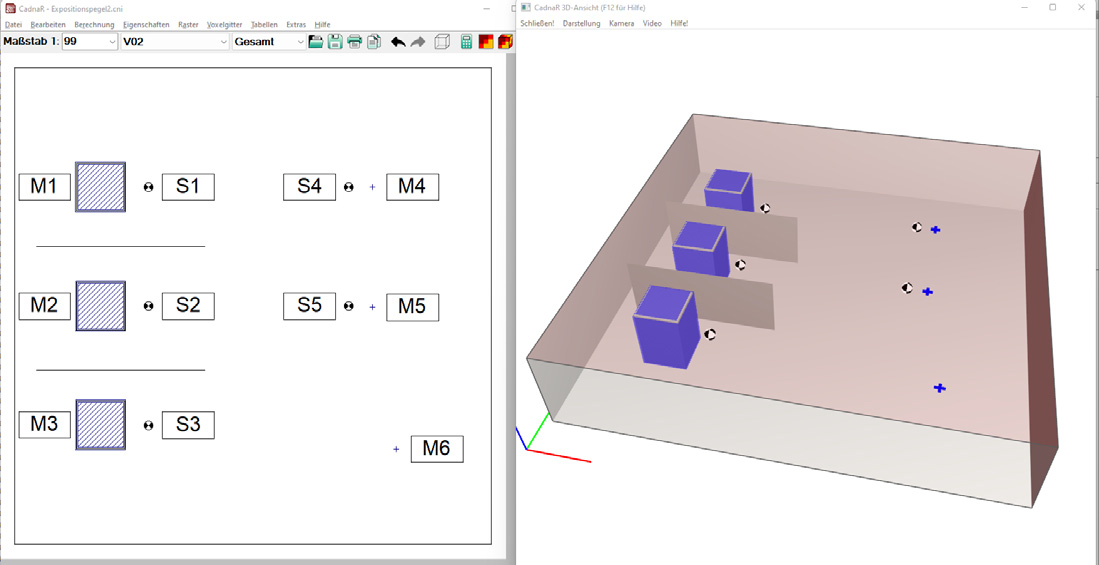
2D and 3D view of the application example
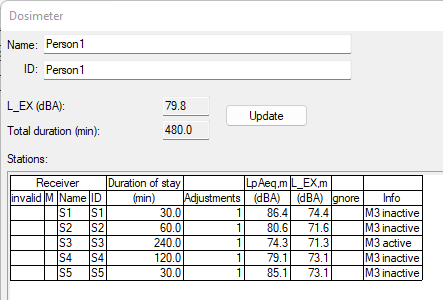
Definition of the activity profile
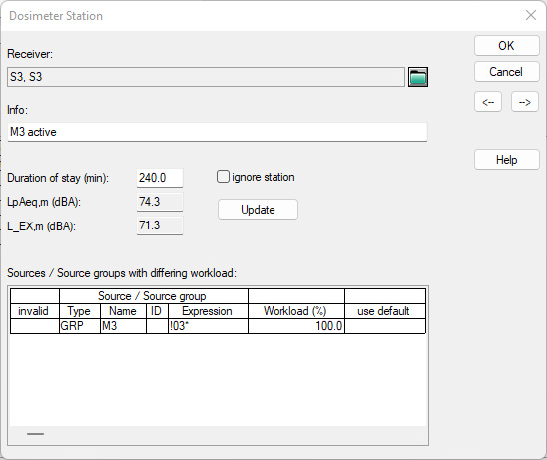 Adjusted workload for machine 3 (as source group): during the stay of person 1 at receiver 3, machine M3 runs continuously (workload 100%) |
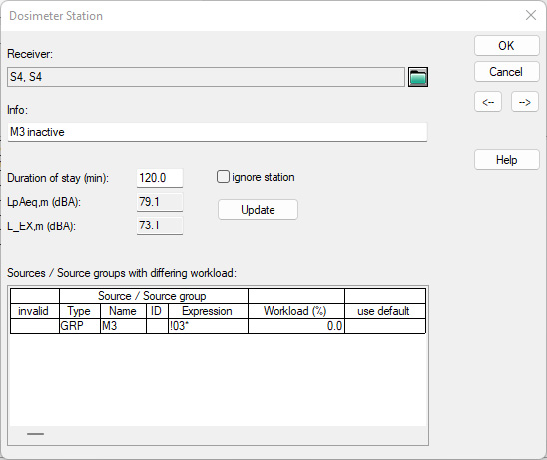 Adjusted workload for machine 3: during the stay of person 1 at immission point 4, machine M3 does not run (workload 0%). Illustration exemplary for immission point 4/station 4, but also valid for stations 1,2 and 5. |