Object Snap
The object snap feature enables to enter new object at the exact same x/y-position of an existing object. This feature is applicable:
- to polygon objects (i.e. all sources and obstacles, including PolyMesh, vertical PolyMesh, Calculation Area and Auxiliary Polygon, but apart from the point source) in order to snap these objects to the room surfaces, the coordinate grid, or to other polygon objects or
- to point objects (receiver and point source) in order to snap these objects to the coordinate grid.
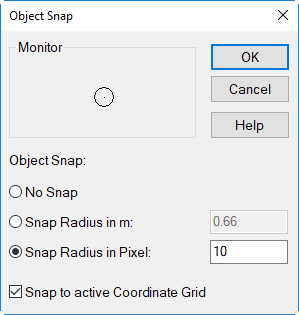
Dialog Object Snap
Object Snap with CTRL key pressed
Note
When entering objects and editing individual polygon points, an object snap to the 2D nearest (polygon) point of an activated object of any type can be performed independently of the settings in this menu.
Dialog options
Object Snap
- No Snap: no object snapping occurs
- Snap Radius in m: When specifying the object snap in meters, the snap radius will depend on the scale selected. In this case, the number of pixels corresponding to the selected scale is shown on the box "Snap Radius in Pixel".
- Snap Radius in Pixel: When specifying the object snap in pixels, the snap radius will be independent from the scale selected. In this case, the absolute distance in meters corresponding to the selected scale is shown on the box "Snap Radius in m".
Option "Snap to active Coordinate Grid"
With the coordinate grid activated the object polygon points will be snapped to the grid points provided they are within the snap radius.
Monitor
In both cases, the size of the object snap is displayed in the monitor.