Generate Machine
The command Generate Machine is available in the context menu of (non-self-intersecting) area sources. For example starting by inputting the the layout of a machine as an area source based on a bitmap layout plan, a machine can be automatically generated consisting out of obstacles (barriers and PolyMesh) and sources (area source for emission upwards and vertical area sources in front of the barriers for the emission to the sides). This command from the context menu simplifies the otherwise more manual approach creating the individual elements by direct input, "Parallel Object" or "Convert to".
The following elements will be generated:
-
Side wall of the machine, barrier:
- xy-coordinates of the polygon of the barrier identical with xy-coordinates of the original area source.
- upper edge zmax corresponds to the height that can be specified in the dialog options
- lower edge zmin = 0
-
„lid“ of the machine: PolyMesh
- xy-coordinates of the polygon of the Polymesh identical with xy-coordinates of the original area source.
- z-coordinate of each polyon point of the PolyMesh corresponds to the height that can be specified in the dialog options.
-
Emission to the sides, vertical area sources:
- upper edge zmax and lower edge zmin as side wall barrier
- xy coordinates shifted outside by offset as specified in the dialog options relative to the barrier
- one vertical area source per segment of the barrier (option max. length see below)
-
Emission on top of the machine, area source:
- xy-coorindates shifted to the inside by offset as specified in the dialog options relative to the PolyMesh.
- z-coordinate corresponds to height plus offset as specified in the dialog options,
Additional notes:
- the name and ID of the area source are copied to all generated objects.
- The sound power of the original area source is preserved by this context menu action and is distributed evenly among the generated area sources.
- The emission spectrum (attribute TEMI) of the original area source is copied to all generated area sources. The option "ajust spectrum to Lwa/Lwa" is always activated for the generated sources.
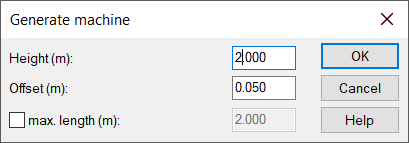
Dialog options
height(m)
Height or top edge of the obstacles belonging to the machine, more details see above.
Offset(m)
Distance of emitting surfaces from the obstacles, more details see above.
Option max. length (m)
Possibility to further subdivide the vertical area sources to be created so that the edge length does not exceed the specified numerical value.
Example
 |
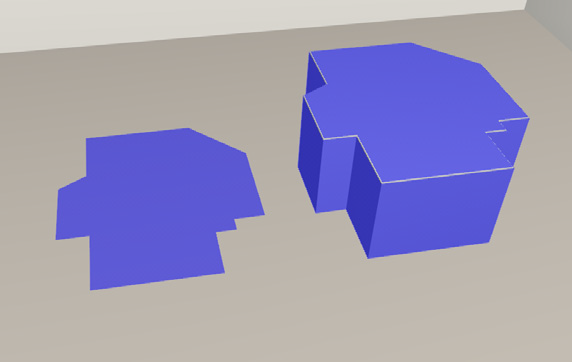 |
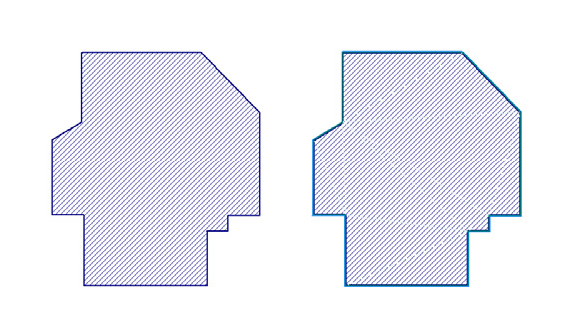
| 2D view of the area source on the left and the machine generated from it on the right | 2D view of the area source on the left and the machine generated from it on the right |