Symbol Bar
Symbols enable to select menu commands or functions by clicking with the mouse. On the Options menu the tool bar can be turned on and off.
The following list boxes are available:
 |
Select or Enter Scale |
 |
Select Variant |
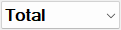 |
Select Total Spectrum or Octave |
and the following symbols:
 |
Open an existing file |
 |
Save a file |
 |
Display dialog Print Graphics |
 |
copies the 2D-room view, the contents of a selected section or the selected object from the CadnaR main window to the clipboard |
 |
undo object input / action / command |
 |
restores an object input / action / command that was previously undone using the Undo command. |
 |
Edit Room Parameters |
 |
Calculate Levels at Receivers |
 |
Calculate Grid |
 |
Calculate VoxelGrid |
 |
Display 3D-View |
 |
Open Show Bitmap dialog (see Show Bitmap) + SHIFT direct toggle: show Bitmaps on/off |
 |
Open ObjectTree dialog (see ObjectTree) |
 |
Open Appearance dialog (see Appearance) |
 |
Diagram of spatially averaged reverberation times (receivers) + SHIFT opens table, + CTRL and SHIFT opens table with variant comparison |
 |
Open table Dosimeter (see Dosimeter (local)) |
 |
Open Auralization dialog (see Auralization) |
After calculation of the voxel grid (see Voxel Grid menu) the grid height displayed is selectable from a further list box:

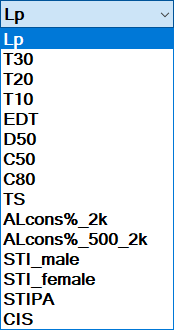
After the calculation of room acoustical parameters on the grid (see "RIR-Evaluation" tab) an additional list box is displayed to the right of the symbol bar to select the level Lp or a room acoustical parameter for the grid representation: