Duplicating Objects
Duplicating a single object
To duplicate a single object in the graphic, first mark this object by a mouse click onto its border. Release the mouse button and click again while holding the CTRL key pressed. The object gets highlighted (1) by a two crossed double-headed arrows and a plus sign. Drag the copy to a new location.
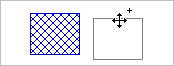
(1)
Now, release the mouse button and afterwards the CTRL key (when release first the CTRL key and the mouse button afterwards the object becomes merely relocated). The duplicated object is visible in the graphic, besides the original (2). The copied object has the same parameters as the original, but just different local coordinates.
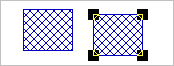
(2)
Multiple copies of an object
Multiple copies of an object are obtained using the command from the context menu of an object (see Context Menu).
Multiple copies of several objects
Multiple copies of several object types can be generated using the action „Duplicate“ on the Modify Objects dialog (see Duplicate).
Duplicating a group of objects
The groups and subgroups defined on the ObjectTree dialog can be moved, copied, duplicated, or deleted as a group (see Displaying & Modifying ObjectTree Groups).