Duplicate
This command is available as an action from dialog Modify Objects and from the context menu of objects. The command Duplicate is applicable to all graphical objects. All duplicates will obtain - besides their geometry - the same parameter values as the original. It makes sense, therefore, to edit the original’s values prior to the duplication procedure.
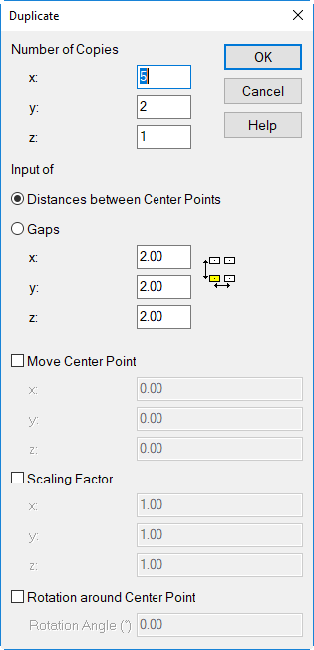
Dialog Duplicate
Dialog options
Number of Copies
Enter the required number of copies (in x, y or z direction). The stated figure includes the original. With negative values, the duplicates are generated into the reversed (negative) coordinate direction.
Enter „1“ in order to not generate duplicates in this direction. Example: (x,y,z)=(5,1,1) generates 5 objects (original + 4 duplicates) in x direction. Entering a zero does not generate any duplicates.
Input of ...
The type of input can be selected. For point objects, this distinction is not relevant.
- Distances between the Center Points: distance measured from the object’s center
- Gaps: distance from the edge or border of an object
- x/y/z: Positive figures generate duplicates into positive, negative figures into negative coordinate direction.When duplicating in the z direction, the minimum and maximum heights are taken into account.
Move Center Point
Upon activation the center point of objects being selected can be shifted in x/y/z direction.
Scaling Factor
Upon activation the duplicated objects can be transformed in x/y/z direction by entering a scaling factor.
Rotation around Center Point
Upon activation the duplicated objects can be rotated around their center common center point.
Note
When duplicating and rotating point sources with a directivity addressed the directivity vector will also get transformed accordingly.