Calculation Area
The object "Calculation Area" is a closed polygon which is used to restrict the grid calculation to a defined area. In a single project file several calculation areas may be defined.
The defined calculation areas are listed in the respective object table (see menu Tables|Calculation Area). The sequence order of areas determines the sequence of calculation.
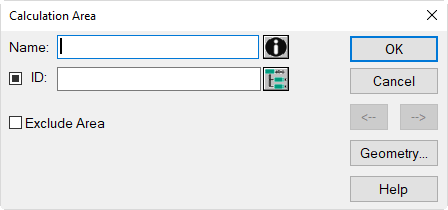
Dialog Calculation Area
Dialog options
- Name, ID, ObjectTree and Memo-Window see Common Input Data
- Option "Exclude Area": This options enables to exclude the respective calculation area when being located inside a further calculation area.Consequently, the grid will not be calculated inside this area.
- Button Geometry: see Common Input Data - Geometry
Note
The specification of the height on dialog "Geometry" of a calculation area has no effect on the height of the receiver grid!