Arithmetics
The dialog Grid Arithmetics on the Grid menu enables to generate a new grid from up to 6 input grids (R1 to R6).
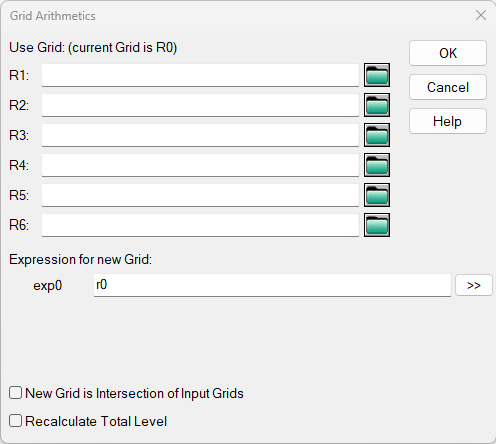
Dialog Grid Arithmetics
Dialog options
Use grids (current grid is R0)
The present grid is addressed by R0. Load by clicking on the respective file selector symbols up to 6 stored grids.
Expression for new Grid
A formula can be entered in this input box, respecting the rules for operators and functions and addressing the grids R0 and R1 to R6. Click OK to start the calculation of the new grid applying this expression.Example:
- grid R1 considers obstacles with screening effect
- grid R2 without obstacles
- difference grid R2-R1 shows the screening effect (Abar) as a grid map
Double Arrow (>>)
Gives access to pre-defined grid designations (based on grids R0 and R1, analogously for grids R2..R6).
New Grid is Intersection of Input Grids
When several grids are selected, this option causes that only the common grid area (where grids overlap) is evaluated and displayed.
Recalculate Total Level
- option deactivated: The octave band levels and the total level are calculated for the new grid from the respective levels of the individual grids (i.e the total level results from the total level of each individual grid).
- option activated: Only the octave band levels are calculated for the new grid from the respective levels of each individual grid. However, the total level is recalculated from octave values of the level spectrum for total (application: with difference grids).
Grids in variants
With several variants in the project file, the grids in variants can be accessed - besides the current variant.
Grid Variables for Evaluation Parameters
The reference to a variant must use a double-digit:
RxVyy or rxvyy with x=0..6, yy=01..16
In case the designation for the variant Vyy is missing the current variant is evaluated. The counting of the variant number yy includes all defined variants, i.e. also those variants which may be temporarily deactivated.
The distinct grids can be addressed as follows:
| R0 | refers to the current level grid. Grid arithmetics would effect the active variant. |
| R1 | refers to a saved level grid loaded via input box R1. Without a designation to a variant it would effect the active variant only. |
| R2 to R6 | analogously as before |
| R1V01 | refers the level grid in variant V01, loaded into input box R1, analogously for variants 02 to 16 |
If the option „for all variants“ (dialog Grid|Properties) is deactivated, always the first variant is used.
Operators and Functions
| == | equal |
| != | unequal |
| >= | greater or equal |
| > | greater |
| <= | less or equal |
| < | less |
| ++ | energetic addition |
| -- | energetic subtraction |
| + | addition |
| - | subtraction |
| * | multiplication |
| / | division |
| ( | open bracket |
| ) | close bracket |
| max | maximum value, e.g.: max(1,2) = 2 |
| min | minimum value, e.g.: min(1,2) = 1 |
| pow | power: pow(a, b) = a^b |
| log10 | logarithm to the basis 10 |
| log | logarithm to the basis e |
| exp10 | x-th power of 10 |
| exp | x-th power of e |
| sqrt | square root |
| sin | sine (argument in radians) |
| cos | cosine |
| tan | tangent |
| ctg | cotangens |
| deg2rad | conversion from degrees to radians |
| rad2deg | conversion from radians to degrees |
| arcsin | arc sine |
| arccos | arc cosine |
| arctan | arc tangent |
| iif | iif(x, a, b) returns a if x!=0, and b if x==0 |
| rand(x,y) | generates a random number in interval between x and y |
| abs | absolute value |
| round(x,y) | rounds the number x to the y-th decimal, e.g.: round(x.4) = x round(x.5) = x+1 round(-x.5) = -x round(-x.6) = -x-1 |
| floor(x) | integer of x i.e.: floor(x.5) = x floor(-x.5) = -x-1 |