Export Report
Results can be exported in XLSX format using predefined templates provided or user-defined report templates via File | Export Report. When exporting via the "Export Report" option, the results of the current variant in CadnaR are output. With the predefined export templates, which contain "Comparison" in their name, a variant comparison with an additional variant is available. The results output via the predefined report templates is intended for the frequency range from 125 Hz to 4000 Hz.
Note
The Export report is an extension of the Export of an Excel Workbook (*.xlsx, *xlsm) function, which is described in "Excel workbook (*.xlsx)". The description contained in that chapter also applies to the "Export Report" function.
Template
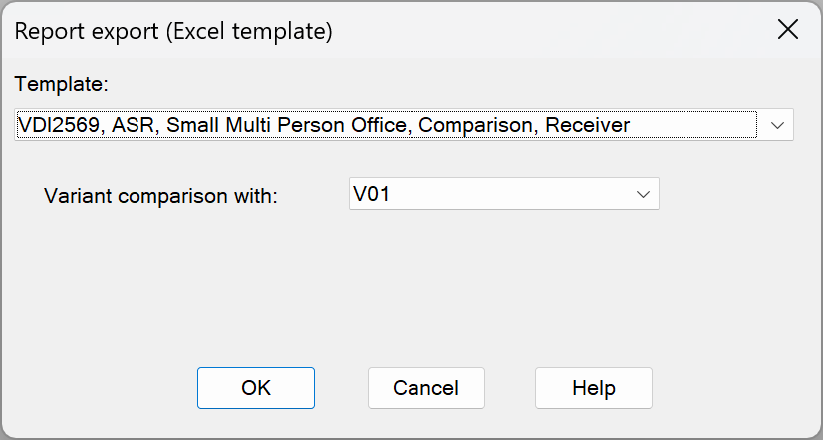
The drop-down list is used to select a predefined report template that has been supplied or created by the user. The supplied templates are named according to the directive or standard in which the requirements used are contained, the room type and the evaluation by receiver or receiver chain and, if available, a variant comparison. In addition to the general templates, templates are available in which the results are presented directly in connection with the requirements according to DIN 18041, ASR A3.7 and VDI 2569. Templates created by the user ( User-defined templates) are arranged at the end of the list and named according to the file name of the XLSX file.
DIN18041 room types
The DIN 18041 room types used in the templates are included in the table below with a description and the valid range for the volume:
| Type | Description | Volume [m³] |
| A1 | "Music" Mainly musical performances | 30 ≤ V ≤ 1000 |
| A2 | "Speech/Presentation" Speech presentations are in the foreground, usually from a (frontal) position. Simultaneous communication between several people in different places in the room is rarely carried out | 50 ≤ V ≤ 5000 |
| A3 | "Speech/Lecture Inclusivity" rooms of usage type A2 for people who are particularly dependent on good speech comprehension. Required for inclusive usage | 30 ≤ V ≤ 5000 |
| A3 | "Teaching/Communication" intensive communication usage with several simultaneous speakers distributed throughout the room | 30 ≤ V ≤ 1000 |
| A4 | "Inclusivity Teaching/Communication" intensive communication usage with several simultaneous speakers distributed throughout the room in accordance with usage type A3, but for people who are particularly dependent on good speech intelligibility. This usage type is not suitable for rooms larger than 500 m³ and for musical usage. | 30 ≤ V ≤ 500 |
| A5 | "Sport" In sports halls and swimming pools, several groups communicate (even simultaneously) with different content | 200 ≤ V |
| B2 | Rooms for short-term stays | - |
| B3 | Rooms for longer-term stays | - |
| B4 | Rooms with a need for noise reduction and room comfort | - |
| B5 | Rooms with special requirements for noise reduction and room comfort | - |
Variant comparison with
When exporting, the results of the current variant in CadnaR are output. Some templates that contain comparison in their name are available for a variant comparison. When selecting a template with comparison, the drop-down list is activated, and a second variant can be selected for the comparison. For self-defined templates, the variant comparison is activated by default.
Export procedure
After calculating the project, selecting a template and, if necessary, selecting a variant for comparison, the dialog can be confirmed with "OK". In the next dialog, the details for the saving process must be entered. The pre-filled report with an already defined print area is then available. In Excel, the Print view can be called up directly via the key combination CTRL+P or via File | Print.
User-defined templates
The templates already supplied and available in the CadnaR installation directory (C:\Program Files\Datakustik\CadnaR64\templates\xlsx) can serve as a guide for processing the output data. Keywords are an essential component of report templates (see Keywords).
User-defined templates can be included in the template list of the report export. To do this, a new folder with the name "new" must be created in the installation directory under the path C:\Program Files\Datakustik\CadnaR64\templates\xlsx. XLSX templates stored in this folder are added to the list with the file name in the template list at the end. When using an alternative file path, the following entry must be created in the INI file:
[Export.XLSX]
NewTemplateDir=path
The term "path" must be replaced by the actual file path used.
The current variant and, if applicable, the variant selected for the variant comparison are transferred from CadnaR to Excel using the following keywords:
Short name of the current variant: #(Text, Exp_V1_Short_Name)
Short name of the comparison variant: #(Text, Exp_V2_Short_Name)
The text blocks are created temporarily in CadnaR for export and are not saved permanently.
Note
The templates supplied in the CadnaR installation directory are read-only. Templates that you have created yourself should only be stored in the folder created for this purpose. The default data is overwritten when CadnaR is updated or reinstalled.