Sound Power Level (local/global)
In this table sound power level spectra can be entered and managed. New lines are generated using the context menu of the table. Double-clicking in a table row opens the dialog Sound Power Spectrum.
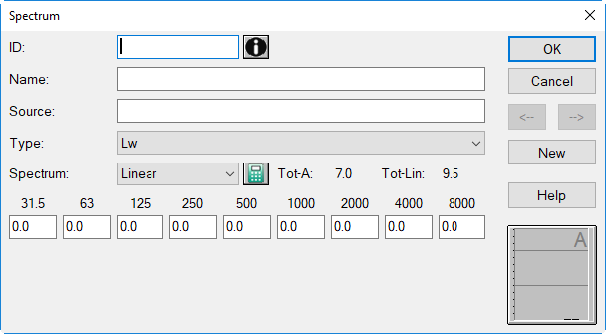
Dialog options
- ID, Memo-Window, Name: see Common Input Data
- Source: description of the data's origin
-
Type: selection of the type of spectrum. Available are:
- Lw: By this selection it is specified that the input spectrum is a sound power level spectrum.
- Lw from Lp+area+nearfield correction: This option enables to determine the sound power level when the radiation occurs e.g. from openings. The average sound pressure level spectrum is measured across the radiating cross section. The calculation occurs according to \(L_w = L_p + 10 * \lg(S) + \text{Nearfield correction}\) with the radiating area S im m².
- Lw from Lp+distance+sphere partition: With an omni-directional radiation the sound power level may be evaluated from measuring the sound pressure level Lp, the source distance r and the sphere partition n% referring to the full sphere according to \(L_w = L_p + 10 * \lg (4 \pi r^2) + 10 * \lg (\frac{n\%}{100\%})\).
Note
With types "Lp+area+nearfield correction" and "Lp+distance+sphere partition" the additional letter "(c)" in column „Type“ of the table indicates a calculated spectrum.
-
Spectrum: Selects the weighting of spectrum to be entered (linear, A, B, C, D). Switching to a different kind of weighting does not alter the spectrum saved. However, when a different weighting is selected while holding down the Shift key, the figures remain unchanged.
-
Pocket Calculator Symbol
 : Via this symbol the present spectrum can be modified (see Modify Spectrum).
 -
Tot-A/Tot-Lin: shows the A-weighted and the linear (unweighted) total levels of the spectrum.
- Octave Bands 31.5 to 8000 Hz: Enter the level in the each octave band here. Consider that a levels 0 dB does not mean "no input" in acoustics. Therefore, when having no data in an octave band available, enter a space or keep the input box empty. This will cause this band to be considered as not valid.
Note
When a value in an octave band is missing for a source, the resulting level after calculation is not shown on the dialog Receiver for the respective octave band ("-99").
- Arrow Buttons <-|->: to move to the next/previous dataset
- Button "New": generates a new table row below the row currently selected
- Default Spectra: spectra for human speech "sti_male" according to IEC 60268-16 and "normal speech" according to DIN 3382-3
Pasting spectra via the clipboard
Spectra values separated by tabulator marks can be pasted from the clipboard. Place the cursor into the box which is supposed to receive the first value and press CTRL+V or select the Paste command from the context menu.