Common Input Data - Sources
- Result. LwA / Result. LwA' (dB) /Result. LwA'' (dB): shows the resulting A-weighted sound pressure level, the A-weighted sound pressure level per unit length or the A-weighted sound pressure level per unit area.
- Sound Power Level LwA (dB): When no emission spectrum is available, enter here the A-weighted sound power level LwA of the sound source. To this end, activate the option "Adjust Spectrum to LwA" on the dialog range "Emission Spectrum".
Note
With the option "Adjust Spectrum to LwA" activated, based on the specified sound power level and the A-weighting, a linear spectrum on octave bands is generated for the selected frequency range (see "General" tab), in the example above from 125 to 4000 Hz.
Dialog Range "Emission Spectrum" for Sources
-
Referencing a Spectrum
 : Click on the file selector symbol to select a sound power level spectrum from the local or global library Sound Power. After selection the spectrum‘s ID gets copied to that box.
- selection from the local library: by clicking the file selector symbol
- selection from the Global Library: by clicking the file selector symbol while holding down the SHIFT key
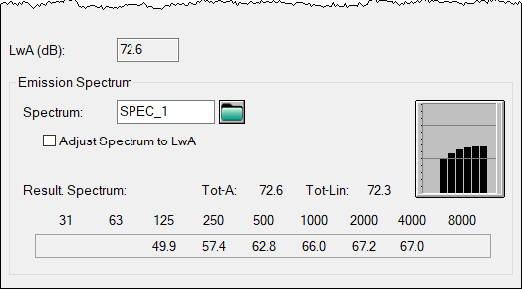
A spectrum from the library has been referenced, here displayed as an A-weighted octave spectrum
-
Formula: The input box may also contain a formula using operators (also using spectra IDs, see Arithmetics). Examples:
- adding 3 dB to spectrum SP1: SP1+3
- energetic addition of spectra SP1 and SP2: SP1++SP2
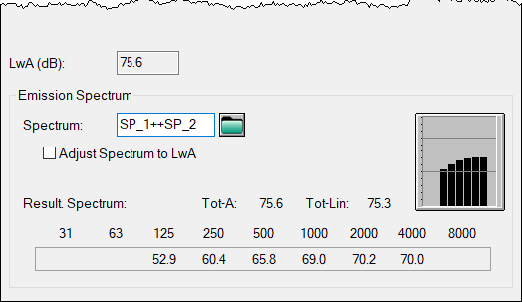
Energetic addition of spectra SP1 and SP2, the box „LwA“ shows the A-weighted sum level
- Option "Adjust Spectrum to LwA": This option is deactivated by default.
- With this option deactivated, a sound power level spectrum can be selected from the local or the global library Sound Power via the file selector symbol. Alternatively, in the "Spectrum" box, a numeric value can be entered, which is interpreted as a linear (unweighted) sound power level per octave band within the specified frequency range (see "General" tab). In both cases, the resulting A-weighted total sound power level is displayed in the grey-shaded box "LwA".
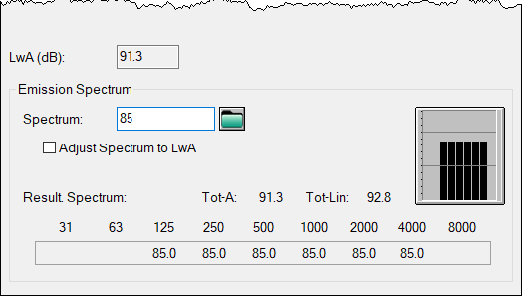
- When this option activated, provided no spectrum is selected (i.e. the box "Spectrum" is empty), the A-weighted sound power level can be entered in box "LwA". Based on this input value, a constant linear sound power level per octave band within the specified frequency range, e.g. 125-4000 Hz, is generated considering A-weighting.
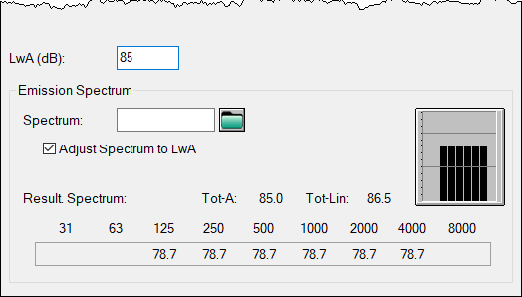
input of LwA generates a linear spectrum
In case a spectrum has been referenced and with the option "Adjust Spectrum to LwA" activated, however, an A-weighted sum level can be entered in box "LwA". In this case, the selected spectrum is normalized to this sum level and the resulting spectrum displayed.
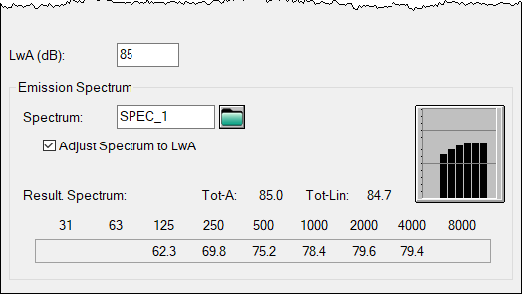
The referenced spectrum is normalized to the entered sum level LwA
- Bar chart/octave values/weighted/unweighted total level: By clicking on the bar graph, the spectrum is displayed in modes linear, A-, B-, C-or D-weighted. The displayed frequency range depends on the setting in the configuration (see "General" tab). Furthermore, the spectral values and the weighted and the unweighted total levels are displayed.
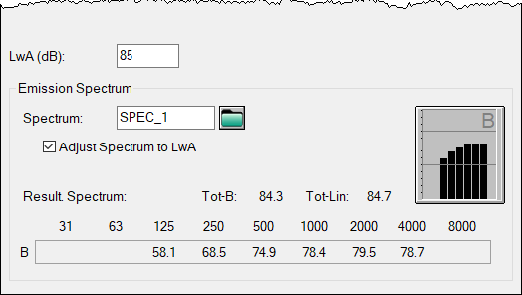
Displaying a linear or A/B/C/D weighted octave level spectrum(here: B weighted)
Option Operating time (min)
The option „operating time (min)“ allows to input the operating time in minutes for not continuously operating sources. The operating time correction for the emission of the source is calculated using the reference time (as stated in the configuration of calculations, see "General" tab):
\(10 \lg \frac{T_{\text{operating time}}}{T_\text{reference time}} (dB)\)