Tables menu
All objects inserted on the graphics are copied automatically as new data sets into the corresponding object table. An object which has been entered via a table will be displayed as a graphic object in the CadnaR main window upon closing the table.
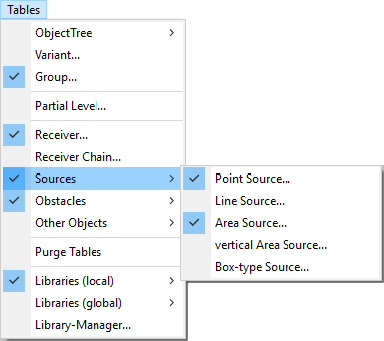
On the Tables menu all objects defined in a CadnaR project are listed as separate data sets in the corresponding object tables. A hook in front of a menu item indicates that at least a single object is listed on the respective table.
Note
For the dialogs ObjectTree see ObjectTree, Variant see Variants, and Groups see Groups.
Opening Tables via the Keyboard
Clicking on an object symbol in the toolbox (see Toolbox) while holding the ALT key pressed will open the corresponding object table.
Closing Tables via the Keyboard
An object table can be closed by pressing the ESC key.
Synchronization
The data sets in tables are synchronized with the CadnaR graphics. When a data set is selected in a table, the corresponding graphical object is activated in the main window as well. When editing the geometry of polygon objects the active polygon point flashes. This indicates what point is currently concerned.
This works also vice-versa: If an object is selected in the 2D plan view and its object table gets displayed, the object‘s table row is highlighted.
Editing Data Sets
Data sets can be inserted, edited, deleted, and copied (see Context Menu in Tables). By changing the table entry directly (input via keyboard), changes are effective immediately. After closing the table, all changes made can be reverted via „Undo“.
Keyboard Commands
In object tables, individual table rows can be copied (CTRL+C) and pasted into a new or an existing row (CTRL+V).
The key combination SHIFT+Enter calls for the edit feature for the currently selected table row (analogous to double-clicking with the mouse).
Purge Tables
This command deletes double spectra (with respect to name or ID) from the local libraries or spectra not addressed by any source (holds for spectra of sound power level, sound reduction index, absorption, and scattering coefficient, and for color palettes, symbols and 3D-symbols).
Note
Regarding the menu commands Variant, Group, Partial Level and ObjectTree see Chapter 8 - Project Organization.