„SDC“ tab
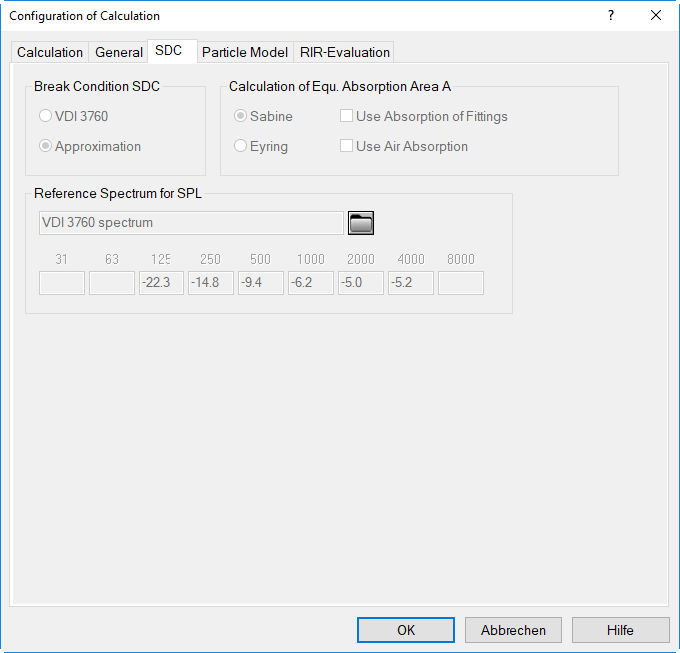
In case the calculation method "VDI 3760" is selected (see "Calculation" tab), the following dialogue options are available:
Break Condition SDC
The break conditions determines the maximum order of image sources being considered within the calculation of reflections.
- VDI 3760: The break condition in VDI 3760, not depending on the room parameters, ensures that the sound pressure level in the room is calculated with a precision of 0.5 dB.
- Approximation: This break condition leads to the same precision of 0.5 dB, but requiring less calculation time.
Calculation of the Equivalent Absorption Area
The equivalent absorption area A and the reverberation time T are calculated using the method selected here. This calculation is, therefore, independent from the selected calculation method.
- Sabine: In can be specified as to whether the air absorption shall be considered or not.
- Eyring: The air absorption will always be considered.
- Use Absorption of Fittings: With this option activated the absorptions from fittings within the room is taken into account when calculating the equivalent absorption area. The specification of the fitting density occurs on the dialog Room Parameters (see Room).
- Use Air Absorption: is available when calculating the equivalent absorption area according to Sabine.
Reference Spectrum for Total
The reference spectrum - whether entered or selected via the file selector symbol - is used in CadnaR to calculate the sound decay curve for the total spectrum (selection for frequency: "Total") from the decay curves of all individual octave bands.
- Reference Spectrum "VDI 3760 Standard": The standard reference spectrum in VDI 3760 is an A-weighted pink noise spectrum. This is the setting to be used when calculating the evaluation parameters of the sound decay curve (DL2, DLf).
- User-defined Reference Spectrum: In case the dominating spectrum in the room is known, this spectrum may be used as a reference spectrum as well. Click on the file selector symbol to enter the spectrum, insert a new row via the table's context menu commands Insert before/after, and enter the linear (unweighted) reference spectrum. In any case, CadnaR calculates from those levels a normalized reference spectrum. This enables to calculate the sound decay curve - referring to the total level in dB(A) - for a source with an arbitrary spectrum.