CadnaR (*.cni)
The CadnaR native file format has the extension cni. A CadnaR file can be imported into the actual file using the command File|Import.
Note
In order to import a CadnaR file containing object tree groups, it is recommended to use the import feature in the Object Tree dialog (see ObjectTree, Import Objects) to adopt the object tree structure defined.
When importing objects from CadnaR files referencing to library objects (such as sound power, sound insulation, absorption coefficient or degree of scattering) it is checked upon import whether objects with the same ID spectra occur in the file to be imported. When the referenced data differs from the original a copy will be generated within the appropriate library receiving a new ID (having attached a counter) and linked.
When importing individual object types (e.g. sources), however, the referenced library objects will not be imported simultaneously.
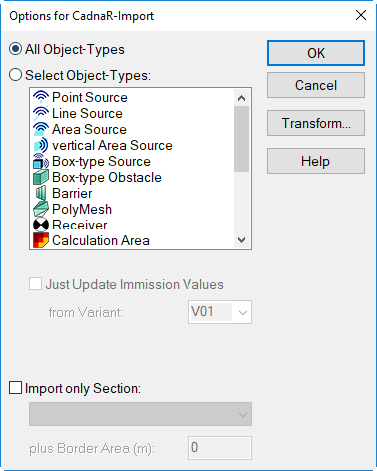
Dialog options
Import all object types / object type selection
This part of the dialog enables to select the object types by highlighting using the mouse. You may use the modifier keys for selection of a list or of multiple objects (modifier keys SHIFT and CTRL).
Option "just update immission values", "from Variant"
Provided the object type „Receiver“ is selected, the receiver levels can be updated from the selected variant, without importing receiver objects themselves.
Option „Import only Section“
When this option is activated an existing section in the CadnaR target file (actual file) can be selected. In this case, just those objects within that section - plus the optionally specified border area - will be imported.
button "Transformation"
see Transformation